NG Injector APK: Android Compatibility, Functions and Guide
How to install MOD NG Injector APK: Android Compatibility, Functions and Guide?
1. Tap the downloaded NG Injector APK: Android Compatibility, Functions and Guide MOD file.
2. Touch install.
3. Follow the steps on the screen.
Description
Android gaming users often search for third-party tools that claim to change game visuals, adjust interface elements, or provide extra customization options. NG Injector APK is one such name that users may encounter while exploring tools related to mobile gaming, including Free Fire.
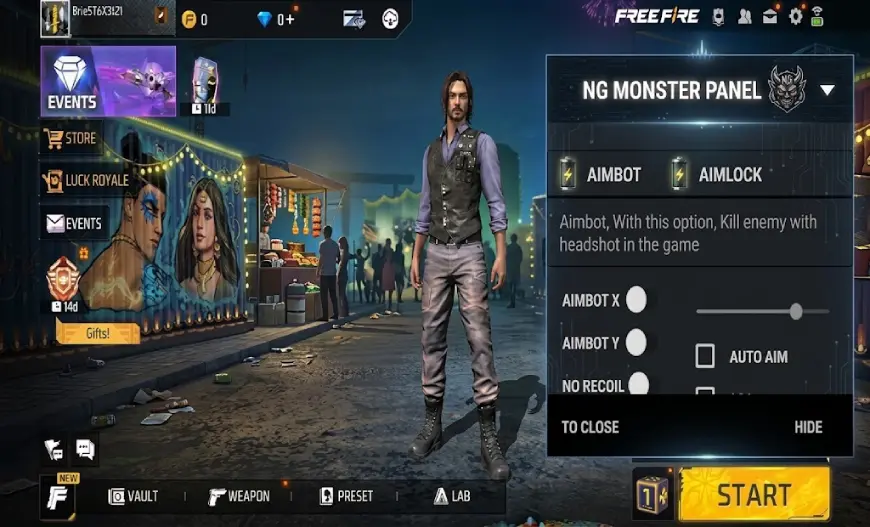
Before installing an application like this, it is important to understand what it does, which permissions it requests, and whether it follows the game’s rules. A tool’s advertised features do not automatically prove that they work as promised or that the application is safe. Also must try this FG8 Game. This guide explains the main points to consider before downloading, installing, or testing NG Injector APK on an Android device.
What Is NG Injector APK Used For?
NG Injector APK is described in third-party gaming discussions as an Android utility associated with game customization. However, its exact functions can depend on the version and the source distributing it. Without a verified developer page or a tested application package, individual features cannot be confirmed. Some third-party gaming utilities claim to modify visual settings, interface elements, or aiming-related behaviour. These claims should be treated carefully, especially when a tool asks users to change game files or grant access beyond normal app permissions. NG Injector APK should not be confused with an official game update or a tool approved by the game developer.
Features to Understand Before Downloading
1. Visual Customization Claims
Some gaming tools advertise changes to character appearance, graphics, or other on-screen elements. Users should check whether these changes are cosmetic or whether they modify game resources. Unauthorised modifications may create compatibility problems or violate game policies.
2. Controls and Aim-Related Functions
A third-party utility may advertise options related to aiming or controls. However, such claims require independent verification. Tools that automate aiming or provide an unfair competitive advantage can put a gaming account at risk.
For more reliable gameplay, use the control sensitivity, HUD layout, and graphics settings available inside the official game.
3. Interface Adjustments
Some utilities claim to provide extra interface settings or change how game elements appear. The result may differ across devices, screen sizes, and game versions. Review screenshots and credible technical information instead of relying only on promotional descriptions.
4. Version Compatibility
An APK that works on one Android version may fail on another. Game updates can also make third-party tools incompatible. Check the application’s stated requirements and update history before considering installation.
Android Requirements and Compatibility Checks
Before opening any APK file, review these basic points:
- Android version: Check the minimum operating system required by the developer.
- Available storage: Make sure the phone has enough free space for installation and normal operation.
- Processor and memory: Older or low-memory devices may experience crashes or slow performance.
- Game version: Confirm whether the tool claims compatibility with the current official game version.
- Screen settings: Display size and resolution may affect how interface elements appear.
- Installation source: Prefer verified developer sources and avoid unknown download mirrors.
These checks can help identify basic compatibility issues, but they cannot guarantee that an unverified application will work correctly.
How to Evaluate an APK File
A download page may use words such as “latest,” “updated,” or “100% safe.” These phrases alone do not establish that a file is trustworthy.
A Simple File Safety Review
- Identify the developer and check whether the publisher has a credible online presence.
- Review the file name, version number, and update date.
- Scan the downloaded file with a reputable mobile security tool.
- Review the requested permissions before granting access.
- Avoid apps that request unnecessary contacts, SMS, accessibility, or device-administrator access.
- Do not enter game passwords or account verification codes into an untrusted utility.
- Delete the file if your security software flags it or its origin cannot be verified.
An antivirus scan can reduce some risks, but it cannot prove that an APK is completely safe.
Installation Problems and Practical Fixes
The APK Will Not Install
Check whether the file downloaded completely and whether your device supports its Android requirements. If the package appears damaged, delete it and obtain a legitimate copy from a verified source rather than trying files from random websites.
The App Closes or Freezes
Restart your phone, check available storage, and install official system updates where appropriate. If the issue continues, remove the third-party application. Avoid disabling security protections just to keep an unknown tool running.
Free Fire Stops Working Properly
First, close the third-party tool and use the official game application. Check for an official game update and follow the game’s own troubleshooting guidance. Do not modify game files to force compatibility.
Security Warnings Appear
Take the warning seriously. Stop using the file, remove the application if necessary, and run a security scan. If you entered account credentials, change your password through the official service and review available account-security settings.
Protecting Your Free Fire Account
Account safety is important when testing any unofficial gaming utility. Some third-party tools may request access to game files or account information, while others may claim to bypass normal game restrictions.
To reduce risk:
- Download the game from its official distribution channel.
- Use the game’s built-in graphics and control settings.
- Never share your password or one-time verification code.
- Avoid tools that promise guaranteed headshots, automatic aiming, or protection from bans.
- Review the official game rules about third-party software.
- Remove unfamiliar applications that behave unexpectedly.
No third-party tool can guarantee that an account will never receive a warning or ban. The safest approach is to avoid software that violates the game’s terms.
Benefits and Drawbacks to Consider
Why Users Research Gaming Utilities
- They want to understand additional customization claims.
- They may be looking for explanations of unfamiliar gaming tools.
- They want to compare device compatibility before installation.
- They need guidance on APK permissions and security checks.
Potential Disadvantages
- The developer or source may be difficult to verify.
- Advertised functions may not work as described.
- Updates can cause compatibility errors.
- Unnecessary permissions may expose personal information.
- Unauthorised modifications may violate game rules or lead to account restrictions.
These are general considerations for third-party gaming tools, not verified test results for a particular NG Injector APK release.
Safer Ways to Improve Mobile Gameplay
Players can often improve their experience without installing extra software. Start by adjusting sensitivity, control layout, graphics quality, and frame-rate settings inside the official game. Close unnecessary background apps and keep the operating system updated. You can also practise movement, aim control, and map awareness in the game’s available training modes. These methods avoid the additional security and account risks associated with unverified modifications.
Final Verdict
NG Injector APK latest version is a topic worth researching carefully before downloading any file associated with the name. Its advertised functions, compatibility, and safety should not be accepted without reliable evidence. Check the developer, examine permissions, and understand the official game’s rules before making a decision. For a more dependable gaming experience, use official game settings and trusted applications. Protecting your device and account is more important than testing unverified features.
Frequently Asked Questions
1. What is NG Injector APK?
NG Injector APK is a name associated with third-party Android gaming utilities. Its precise purpose and features should be verified through a credible developer source.
2. Is NG Injector APK an official Free Fire app?
Do not assume that it is official. Check the game’s verified website and approved application listings.
3. Can NG Injector APK run on every Android phone?
No universal compatibility can be confirmed. Requirements may depend on the APK version, Android release, hardware, and game update.
4. Is it safe to download NG Injector APK?
Its safety cannot be confirmed without examining the exact file and its source. Review permissions, scan the file, and avoid packages that request unnecessary access.
5. Can a third-party tool guarantee that my account will not be banned?
No. Unauthorised tools may violate game rules, and no external application can guarantee account protection.
6. What should I do if the application causes errors?
Stop using the tool, remove it if necessary, scan your device, and return to the official game version. Follow official support guidance if your account is affected.